HMI
WorkDeck
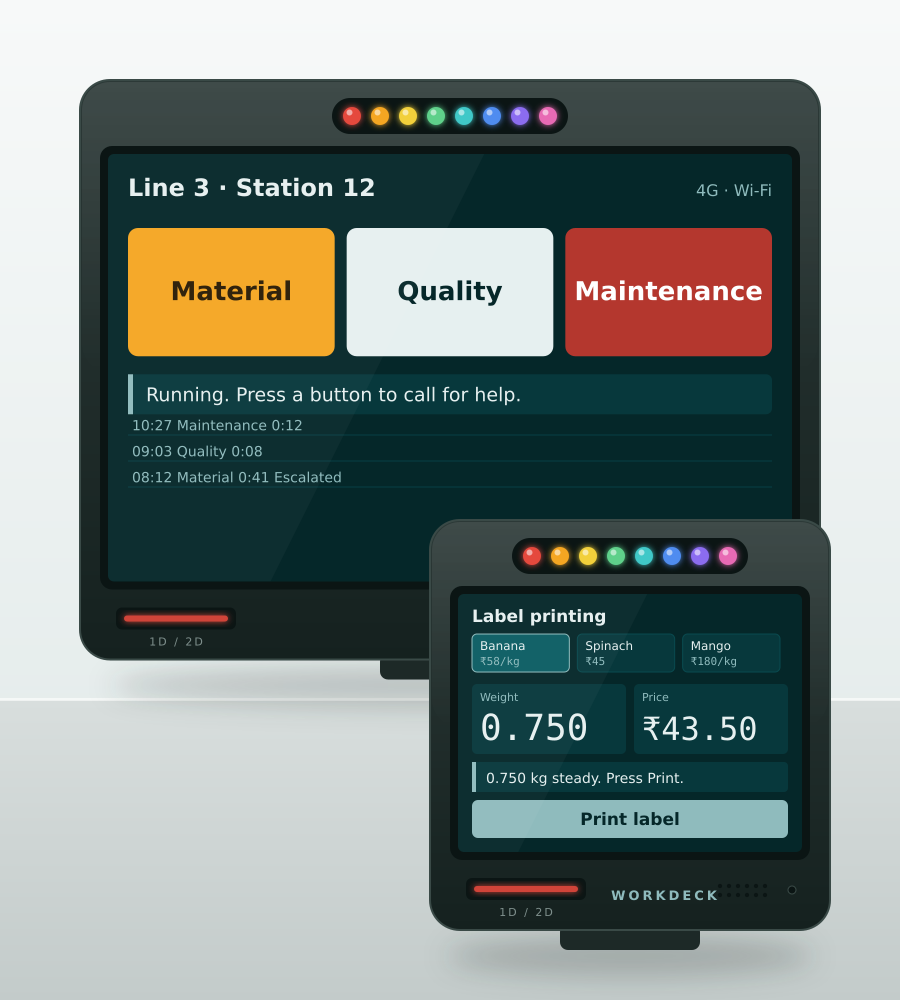
A touchscreen terminal with a 1D/2D barcode scanner, an RGB light bar, a speaker and a microphone in one enclosure, in a 3.5" size for the table and an 8" size for the line. It runs ready-made flows, or one you describe to an LLM.
At a glance
3.5" · 8"
Two screen sizes
1D + 2D
Built-in barcode scanner
8 × 1RGB
LED bar
Wi-Fi + 4G
Standard connectivity
Overview
Everything an operator needs at a station is in the one enclosure. A touchscreen to tap. A scanner to read the badge, the table card or the part number. A row of eight RGB lights you can see from across the floor. A speaker for the beep and a microphone for the rest. Wi-Fi and 4G as standard, so it works where there’s no network cable.
It comes in two sizes. The WorkDeck 3.5 is for the table: a pack bench, a counter, a desk. One view at a time, big targets, small footprint. The WorkDeck 8 is for the line and the workstation, where there’s room to show the order and the menu, or the call buttons and the log, side by side.
What it runs
A WorkDeck does whatever its screen says. Some screens come ready-made:
- Andon. Three buttons, a coloured light bar and an escalation timer.
- Material call. The operator asks for more, and the handler’s badge scan closes it.
- Restaurant POS. Tap the menu, send the ticket to the kitchen, take the payment, print the bill.
- Label printing. Pick the SKU, read the scale, print the label.
And there are more where those came from.
Or describe your own
Nobody has to wait for us to build a flow. Describe the screen to the LLM you already use, in the words you’d use with a new hire. What the buttons are. What a scan should do. When the light should go red. It hands back a screen and the WorkDeck runs it.
That’s the whole interface. The simulator below starts there.
What it connects to
Three ports take the rest of the station: IO for a stack light, a button or a sensor, RS232 for a scale or an older machine, and USB for a printer, a keyboard or a mouse.
Try one
1. Describe the screen
Pick one of the three below. Or describe your own to the LLM you already use.
The screen description it came back with
Illustrative. Your LLM will word it its own way.
Lines and workstations
- IOFree
- RS232Free
- USBKeyboard, mouse or a device
Present a code to the scanner
Choose a flow first.
Printed
Nothing printed yet.
A simulation, not a recording. The three prompts are real examples; the screen description the LLM returns is representative, because every LLM words it differently. The stock, prices, badges and tables are made up.
Specifications
Parameters
| Models | WorkDeck 3.5 and WorkDeck 8 |
|---|---|
| Display | 3.5-inch touchscreen (WorkDeck 3.5), 8-inch touchscreen (WorkDeck 8) |
| Intended use | WorkDeck 3.5: table-mounted workflows. WorkDeck 8: lines and workstations |
| Barcode scanner | Built into the enclosure, reads 1D and 2D codes |
| Indicator | 8 × 1 RGB LED bar built into the enclosure |
| Audio | Built-in speaker and microphone |
| Connectivity | Wi-Fi and 4G as standard |
| Slots | SD card slot and SIM slot |
| Mounting | Magnetic, pole and wall mount options |
| Peripheral ports | IO, RS232 and USB (keyboard and mouse) |
| Pre-built flows | Andon, material call, restaurant POS, label printing and more |
| Custom flows | Describe the screen to an LLM such as Claude or ChatGPT |
Next step
Specify a workdeck for your site.
Tell us the read distance, the throughput and what it has to talk to. We will confirm the configuration, or point you at a simpler device.
or write to [email protected]