Hardware
Weighing scale compatibility
What the data logger needs from a scale, and how to check a scale you already own by capturing its serial output on a laptop.
The Weighing Scale Data Logger reads weight over a serial port. Any scale that sends its weight as text will work, and most scales made in the last few years do. The way to be sure is to plug the scale into a laptop, look at what comes out, and send us a sample. This page covers what we expect to see and how to capture it.
Questions go to [email protected]. For buying advice, [email protected].
What the data logger expects
RS232 is the one we recommend. It is the most common rugged option on scales. RS485, USB and Ethernet are also possible, but send us a sample scale first.
| Protocol | RS232 |
|---|---|
| Connector | DB9 |
| Baud rate | 9600. The logger ships set to 9600. Other common rates are 1200, 2400, 4800, 19200, 57600 and 115200, and all can be configured. |
| Serial settings | 8 data bits, no parity, 1 stop bit, hardware flow control off |
| Data format | Text, one reading per line, e.g. 1.234 KG followed by a carriage return and line feed. The logger detects text formats on its own. Proprietary binary formats can be added on request, along with a sample scale. |
| Measurement rate | 10 readings per second. This is the industry norm and a good balance of speed and accuracy. |
Test a scale
You need about fifteen minutes, a laptop and three things:
- The scale, powered on, with a serial output you can reach. Look for a port labelled RS-232 or COM.
- A USB to RS232 cable (a USB-to-DB9 adapter). Adapters built on FTDI or Prolific chips are the least trouble.
- A serial terminal program. Pick one from the table below.
Find the port on the scale
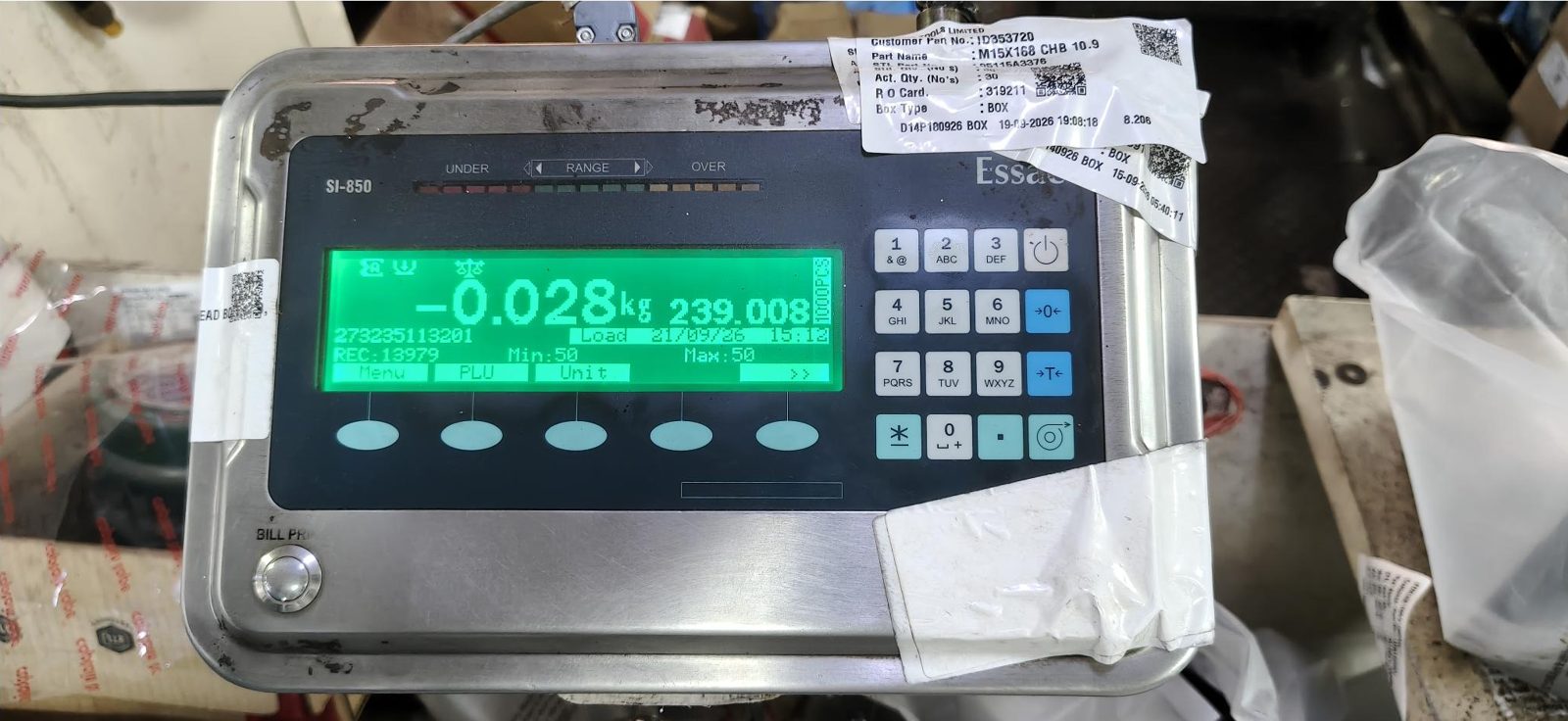
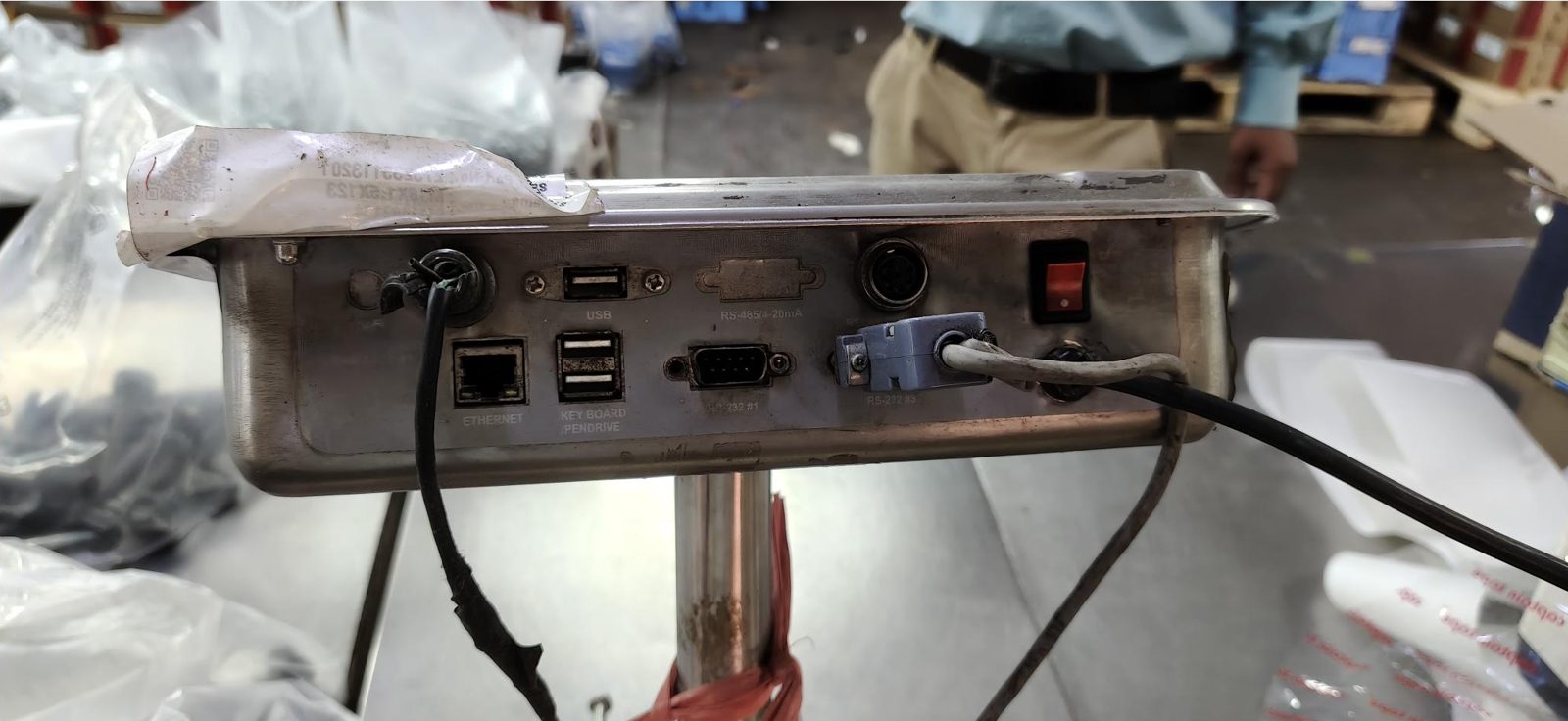
Indicators like the Essae SI-850 have several connectors on the back. Use the one labelled RS-232. This unit has two, #1 and #3.
Connect
- Plug the USB to RS232 cable into the laptop.
- Plug the DB9 end into the scale’s RS-232 port.
- Note which serial port the laptop gave the cable, using the steps for your system below.
If you get no data later, check the plugs. Most USB adapters end in a male DB9, so a scale with a male port needs a female-to-female gender changer. If the connector fits and still nothing arrives, try a null-modem adapter, which swaps the transmit and receive wires.
Open a terminal
Use these settings in all of them: 9600 baud, 8 data bits, no parity, 1 stop bit, no flow control. If the scale’s manual says it uses something else, use that and tell us.
| Windows | Mac | Linux | |
|---|---|---|---|
| Program | HTerm | screen, built in. CoolTerm if you want a window. | minicom |
| Port | COM3, COM4 etc. Open Device Manager, expand Ports (COM & LPT), and see which one appears when you plug the cable in. | /dev/tty.usbserial-*. Run ls /dev/tty.usb* | /dev/ttyUSB0. Run ls /dev/ttyUSB* |
Windows. If the port does not show up in Device Manager, install the driver for the adapter’s chip (the seller’s page will say which). In HTerm, pick the port, set the baud rate, data bits, stop bits and parity, and press Connect.
Mac.
ls /dev/tty.usb*
screen /dev/tty.usbserial-XXXX 9600
Quit screen with Ctrl-A, then K, then y.
Linux.
ls /dev/ttyUSB*
sudo minicom -D /dev/ttyUSB0 -b 9600
Without sudo you will need to be in the dialout group. Inside minicom,
press Ctrl-A, then O to set 8N1 and turn hardware flow control off. To
write what you see to a file, start it as minicom -D /dev/ttyUSB0 -b 9600 -C scale.log.
What to look for
Many scales send nothing until they are told to. If the screen stays blank, open the scale’s menu and look for a serial or communication setting, usually called continuous output, stream or auto-send. Turn it on.
A working scale prints a line of text several times a second, something like:
1.234 KG
1.234 KG
1.235 KG
Garbled characters, boxes or question marks mean the baud rate or the data bits are wrong. Close the port, change the baud rate to the next one up the list (1200, 2400, 4800, 9600, 19200, 57600, 115200) and open it again.
Capture a sample
With the data scrolling:
- Leave the platform empty for about ten seconds.
- Put a weight on it that you know, and leave it for ten seconds.
- Take it off again.
Copy everything from the terminal into a plain text file. Do not paste it into Word or a chat window, which will strip the line endings we need to see. In minicom or screen you can use the log file from above. In HTerm, select the received data and copy it.
Send it to us
Email [email protected] with:
- the text file
- the scale make and model
- the baud rate and other serial settings you ended up using
- a photo of the front and of the back panel, like the two above
We will tell you whether it works as it is, or what needs to change. Setup steps for the Essae DS-252 and the Mettler Toledo IND560 are in Weighing scale configuration.
Choosing a scale
We recommend Essae scales because they have worked well for us and for our customers. We have no affiliation with them. Ask your vendor for advice on your own case. Scales need recalibrating and certifying every year, so pick a vendor who can send someone to you.
| Truck weighment | Steel or concrete weighbridge, 10 T to 180 T. Essae TM-960. |
|---|---|
| Pallet and bulk | Platform scale, 500 kg to 5 T. Essae DX-415. |
| Crate and tote | Platform scale, 25 kg to 500 kg. Essae DS-215. |
| Package and product | Desktop scale, 1 kg to 15 kg. Essae DS-252. |